Transferring Secret Keys through the request header
Credential information obtained through an agency assigned to a function created as
HTTP functions (created from scratch or using a container image),
Event functions (created using a container image only)
can only be transferred through request headers.
For event functions created from scratch, the credential key information can be accessed through the context object of the function in the function handler.
The credential key information includes Security Access Key (AK), Security Secret Key (SK), and Security Token.
This allows you to call other T Cloud Public services using API requests with the transferred keys for authentication.
To obtain the Security Access Key (AK), Security Secret Key (SK), and Security Token of an HTTP function as shown in Table 1, perform the following steps:
Log in to the FunctionGraph console console and go to the details page of the HTTP function to be configured
Choose Configuration > Permissions and specify an agency of Agency Type Cloud Service for Cloud Service FunctionGraph Service with needed policies assigned.
Choose Configuration > Advanced Settings and enable Include Keys.
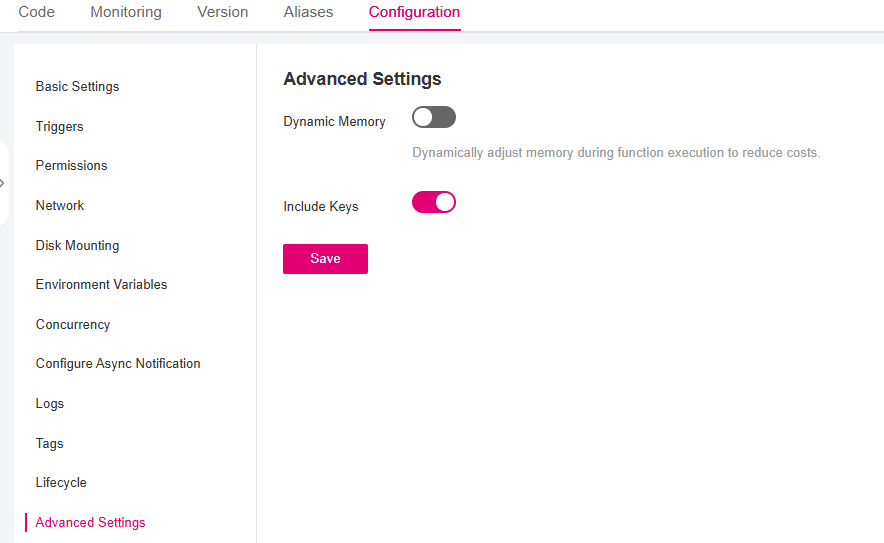
Enable transferring secret keys through the request header.
Header Name |
Description |
|---|---|
X-CFF-Auth-Token |
A token is an access credential issued to an IAM user to bear its identity and permissions. |
X-CFF-Security-Access-Key |
A temporary Security Access Key (AK) is issued by the system to IAM users. |
X-CFF-Security-Secret-Key |
A temporary Security Secret Key (SK) is issued by the system to IAM users. |
X-CFF-Security-Token |
A temporary Security Token is issued by the system to IAM users. |
Note
The temporary Security-Access-Key, Security-Secret-Key and Security-Token must be used together.
On details how to use the Security-Access-Key, Security-Secret-Key, and Security-Token to call other T Cloud Public services using API request, see Developer guide for request signing for Node.js
Hint
In Terraform set enable_auth_in_header to true in the resource opentelekomcloud_functiongraph_function_v2 to enable transferring keys through the request header.